13 Jun 2007 - permalink
Steve Jobs held his anticipated keynote for the WWDC 2007 in San Francisco two days ago. Apple has put up a stream of the keynote for the interested. During that keynote, Steve talked about and demoed 10 new features in the version 10.5 of Mac OS X called Leopard.
I’m gonna go over some of them with a few thoughts.
-
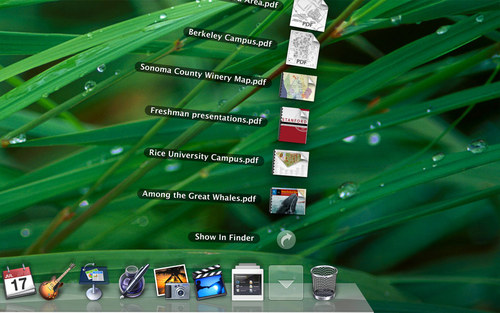
New Desktop - a consistent GUI, a semi-transparent menubar a new Dock with Stacks
The consistent GUI brings with it the playlist type of sidebar that iTunes first introduced and Mail also uses. This is no doubt due to the fact that, according to Steve, 500 million Windows users have downloaded iTunes - they (and practically all Mac users) already know how to use it.
A semi-transparent menubar seems like an odd decision, particularly to long time Mac users. It could help keep focus on the current task (as will the added depth to the active window). However, the menubar is still the only indication of the active application it seems and that will confuse some users. To switchers the change will make their new Mac look more like Windows and ensure association of the Dock with the missing Task bar. I’d have preferred the menubar to fade up on mouseover.
The stacks in the Dock is a great idea and really adds to the useability of folders in the Dock and the addition of a stack for downloaded content is great (for those new to the platform). I’d love to have stacks elsewhere, on the Desktop for instance, but I doubt it.
The 3d effect with reflections in the Dock is useless but help sell computers and, I suppose, make the UI look more ’live’ - important when you’re competing with Vista.
-
New Finder
Using the aforementioned playlist from iTunes is a welcomed improvement over the hackish implementation that is the current Finder sidebar.
Including default smart folders is a smart move - something even Vista has. I hope Spotlight 2.0 will bring vastly improved creation of smart folders.
The column view preview, unfortunately, does not seem to include the ability to set Spotlight keywords - something I’ve missed from day one. Of course, this might change come October. I hope the Save dialogs have this option as well.
I’d really like to see a scaling slider in the lower left corner of Finder windows for changing icon sizes like iPhoto scales photos.
Coverflow in Finder looks good and is very nice for browsing photos or just anything recognizable in small. It would, however, seem useless for browsing text heavy documents.
-
Quicklook is just plain cool
-
Time Machine
Even though I’ve recently automated backup to a remote server, having a built in solution with history will benefit all. I wonder how fast it will be browsing/searching back through time though. The rumored addition of the ZFS filesystem would help in this regard.
Another thing yet to be seen is how well it behaves on portables where the backup drive might not be connected at all times.
-
Mail
Bringing RSS feeds to Mail makes perfect sense to me. It is very much like a web version of newsletters. Data detection (though hardly new, Apple once had something called Apple Data Detectors that did the same) is a very nice addition and something I expect to be system wide.
I have no intention of using the HTML templates. Much like text documents (.txt or .rtf over .doc), I prefer mail as plain as possible.
-
Core Animation
GPU accellerated animations in every program is sure to bring some GUI experiments. It is the next step of Quartz Extreme and it will be interesting to see how developers - and Apple - put this to use in the future. I’m sure iPhoto, for instance, could benefit from it when dealing with massive amounts of photos.
That was my take on some of the stuff we’ll see in the Leopard. Please share your thoughts in the comments - there is still a long time till October…
1 Jun 2007 - permalink
I just came across Richard Sweeney’s paper scultures exploring fractal form in a very fragile yet tangible form. They are among the most beautiful things I’ve seen in quite some time.
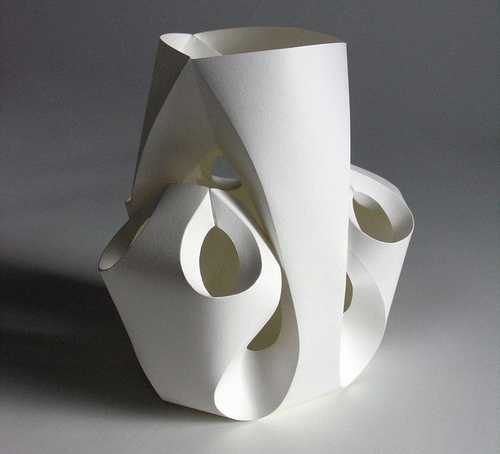
Remarkable pieces of art, some have a very organic feel to them, others a minimalistic approach to architectural forms and others still are purely geometric. What they all have in common is that, in a pleasingly playful way, only the essense remain, something I am absolutely drawn to. Remarkable!
As much as I enjoy looking at the photos of these paper sculptures, I would love to see them up close to truly appreciate the depth and curvature of these.
31 May 2007 - permalink
Yesterday Microsoft unveiled the Microsoft Surface, a table with a multi-touch screen. Watch the videos on Microsoft’s site, then view the Popular mechanics behind the scenes video. Very, very cool stuff.
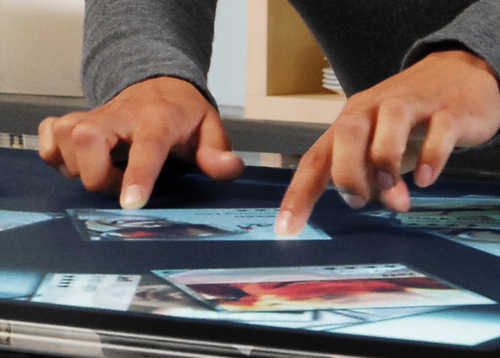
Image copyright Microsoft
The interface is very similar to what will be in Apple’s upcoming iPhone and also the impressive work of Jeff Han of Perceptive Pixel.
Interacting with computers this way holds some very promising possibilities, many of which will lead to the disappearance of the computer as a percieved device and a strengthening of the illusion of manipulating the digitally represented objects directly (with the desktop metaphor being one of the first). As Microsoft, Apple and Jeff Han all enjoy demonstrating, looking through digital photos is an obvious example of this.
Called “ubiquitous computing”, a term coined by Mark Weiser at Xeroc PARC (who also did some of the early work on graphical user interfaces and from which Apple borrowed some ideas), it describes a future where computers seize to exist in the way we think of them today and instead merge with other objects to enhance them. Regardless of how great or not so great the new Nokia N95 phone is, the slogan “It’s what computers have become” can be seen as a play on the concept. I recommend reading Mark Weiser’s “The Computer for the 21st Century” for an interesting novel on what the future might bring.
25 Apr 2007 - permalink
I use my MacBook Pro for development and mainly use the open source database server MySQL. There are binary install packages for most Mac OS X systems, including Intel optimized ones and so it is very easy to setup. For maintenance and monitoring, I recommend installing the MySQL GUI Tools.
Always looking to speed things up, I read a bit on the query cache in MySQL 5 to improve the database performance. It turns out the cache is disabled by default. To enable the query cache, write the following in /etc/my.cnf:
[mysqld]
#The memory allocated to store results from old queries.
query_cache_size=1024k
Or, alternatively, set the value with MySQL Administrator under Options, Performance. I am - obviously - seeing noticable speed improvements with the cache enabled, particularly since web development tends to involve numerous refreshes of the same page, i.e. the same queries.
The cache shouldn’t go alone. You should always make sure you use indexes on the fields used in SELECTs and normalize the tables (There are occasions where normalization will slow down queries due to expensive JOINs, see Cal Henderson’s flickr talk for instance).
MySQL related, here’s a quick explanation of JOINs by Ligaya Turmelle.
9 Apr 2007 - permalink
With harddrives continuing to fall in price, having access to hundreds of gigabytes at home is increasingly common. This calls for and provides the means for easy backup of the thousands of files, we create every year with photos being the largest group.
Having your backup sitting next to the computer is less than optimal. In case of fire or theft, the backup will likely be destroyed or stolen too. You’d think that the hosting companies would offer increased storage as the price per gigabyte drops but with the notable exception of Dreamhost, this is not the case. Offering 170GB and practically unlimited traffic for about $8 a month, Dreamhost fits perfectly as a remote backup storage solution.
Michael Lee has written a two-part guide to backing up your Mac to Dreamhost. Even if his steps are beyond point-and-click, they are well explained and anyone with interest should be able to follow them.
Building on his AppleScript to automate the backup procedure, I’ve added Growl support and sending a mail upon completion. Growl is a great little application that lets other applications post unobtrusive notifications of events (CD ripping complete, new email, current iTunes track, etc.) on the screen.
First, we check if Growl is running at all
tell application "System Events"
	set isRunning to
		(count of (every process whose name is "GrowlHelperApp")) > 0
end tell
If it is, we register the script as a notifier and post a notification that the backup has started
if isRunning then
	tell application "GrowlHelperApp"
		register as application "Dreamhost Backup Script"
		all notifications {"Backup"}
		default notifications {"Backup"}
		notify with name "Backup" title "Dreamhost Backup"
		description "Starting backup to Dreamhost..."
		application name "Dreamhost Backup Script"
	end tell
end if
Then comes the actual backup code. We store the result of the backup in backupResult
set backupResult to do shell script "rsync -avz --delete-after
~/Documents/ USER@SERVER:~/laptop.bak/Documents/"
Finally, we send an email with the results of the backup:
tell application "Mail"
	set newMsg to (make new outgoing message with properties
		{visible:false, content:theContents,
		subject:"Dreamhost Backup on "
		& short date string of (current date)})
	tell newMsg
		make new to recipient with properties
		{address:"[email protected]"}
	end tell
	send newMsg
end tell
This provides feedback when the backup starts in case you’re sitting in front of the computer and sends a mail with a log of what was backed up and if any errors occured.
31 Mar 2007 - permalink
What has been a long interest of mine in writing simple, maintainable and secure (a.k.a. Good[tm]) code, has forked off the offspring of optimization.
There are nummerous discussions in the blogosphere about whether to use echo versus print, if for() is faster than while(), etc. and though the gains are usually very small, I desided to add my thoughts to the debate.
I found an article on optimization through coding habits in Ilia Alshanetsky’s zend performance slides and decided to test some of the claims. My test machine is my MacBook Pro 1.83GHz w. 2GB RAM, MacOS X 10.4.9, Apache 1.3 and PHP 5.2 (with Xdebug 2.0). I also have lots of applications running.
-
Peter Bowyer claims that require_once() is 3-4 times slower than require(). Ilia also says they are bad. My testing reveals the exact opposite with an empty include file. Calling require_once() 10000 times in a for() loop with an empty file is 4x faster.
-
Ilia advises against using magic functions like __autoload() and __get(), but the advantage of __autoload() in particular is obvious in any large project and is used by many php frameworks. My primitive testing, however, shows inverse results. With a simply autoload requiring a class and 10000 loops of new Foo() versus require_once('foo.php'); new Foo() shows that __autoload() is ~3.7 times faster. I saw no difference between real methods and __get(), although the logic inside __get() will add some overhead.
-
If a class method can be static, declare it static. Speed improvement is by a factor of 4. I get a 50% speed increase (614ms vs. 414ms with 100000 iterations).
-
Avoid function calls within for() loop control blocks. In for( $i=0; $i<count($x); $i++ ) the count($x) is called at every iteration.
-
Always, always quote array keys. $row['id'] is way faster than $row[id]. Ilia says 700%, I say about 200%.
-
Avoid regex if possible. Use ctype_digit($foo); rather than preg_match("![0-9]+!", $foo);.
-
Get rid of ‘harmless’ error messages - they take time to generate and output. The error supression operator @ is slow, so avoid when possible. With error_reporting set to E_ALL | E_STRICT on my machine, doing echo $rows[id] 10000 times instead of echo $rows['id] takes 38 times longer.
UPDATE: To summarize, this slow code runs in 500ms (although this time will vary a great deal depending on your error_reporting level):
$rows = array_fill(0, 10000, array('id'=>0));
require_once('foo.php');
for( $i=0; $i < count($rows); $i++) {
	foo::notdeclaredstatic();

	$rows[$i][id] = 0;
}
By using the techniques above, it can be made to complete in 68ms:
$rows = array_fill(0, 10000, array('id'=>0));
function __autoload($classname) { require_once( 'foo.php'); }
$size = count($rows);
for( $i=0; $i < $size; $i++) {
	foo::declaredstatic();

	$rows[$i]['id'] = 0;
}
10000 iterations is a lot for one request to a page. Using the techniques, the code became roughly 7 times faster.
I am not out to prove Ilia wrong - he knows PHP better than most - and for all I know, they could have optimized those very functions in PHP 5.2. I am, however, interested in seeing what can be done to optimize PHP performance simply by doing things differently, by tweaking one’s coding style. It would appear that there are improvements, albeit small, to achieve from minimal effort. Plus I was surprised by the discrepancies I found compared to Ilia’s recommendations.
15 Mar 2007 - permalink
This video by Michael Wesch of Digital Ethnography is one of the greatest things I’ve seen in quite some time:
It captures so much of why I love the web, why I enjoy building things that people can interact with and does it beautifully by doing what it explains. Brilliant!
The article from which sentences are highlighted is We Are the Web from Wired.
(via The Long Tail)
27 Feb 2007 - permalink
More than two months have passed since I came back to Copenhagen. For the capital of Denmark it really is a small city compared to the vast London. Acting on my thoughts on a future work path, I’ve decided to pursue my interests in software development and project management and I am now working full time with web development, predominantly in PHP and MySQL.
I’ve been able to continue working for my last British employer here in Denmark. Known as isporty it is a social networking site for sports people and it launched about two weeks ago with quite a few features that I think anyone into sports would welcome.
Development on isporty is taking almost all of my time as we weed out any remaining bugs and continue to implement and tweak features. Crunch time is hard work and there’s always another deadline :) On the other hand, seeing the project progress and go live is a significant joy.
Andreas and I are working hard to complete the Danish online music store Tape5. Although development have been slow while I was in London, we’re trying to get things moving again and we are getting very close to announcing a launch date.
I regularly get much appreciated emails from users requesting new features in Retrospective or ShowOff. Despite the infrequent updates, I write these requests down for me to look at in calmer days. I hope to implement many of them soon.
Concurrent with my software development plans, I try to find time to delve deeper into the Zend Framework for PHP (yes, there will be a part 2 of Reimplementing the site - this time using Zend). I am so compatible with their approach :) I also keep this ever growing Amazon wish list. It might be time for me to order again.
No matter what, I should definitely post more often to this website.