25 Feb 2009 - permalink
Some weeks ago I linked to a post by Alex Payne called
The Case Against Everything Buckets
in which he argues that organizational applications such as Yojimbo,
Evernote, Together,
etc. are a bad idea because they recreate the structuring features of the filesystem. I linked to it because I agree that applications should refrain from recreating existing functionality. Rather they should expand on what is already there.
It has become painfully obvious that the old desktop metaphor just doesn’t cut it for the tens of thousands of photos, thousands of songs and hundreds of documents we all store. They are not practically manageble through the standard interface to the filesystem, Finder (or Explorer on Windows). They are not and should not be clever enough to handle every organizational idea. The Finder, despite critisism, handles hierarchies of files and folder rather well. It should not be extended to make it a photo browser and media player (though I am tremendously happy with Quicklook). So what would work?
As Alex Payne writes:
use software that does one thing well.
This rhymes perfectly with traditional Unix philosophy and to some extent Apple’s approach to software. It makes for simpler applications and with inter-application communication (AppleScript, Automator, Unix pipes, et al.), powerful tasks can be accomplished without reinventing the wheel.
I’ve previously written about my thoughts on extending the file system in One Application to Rule Your Files and the idea fits perfectly with organizational software. Don’t recreate the filesystem – provide a better view to the files thrown in there. Applications like iTunes, Together and Tagbot all provide alternate views to files in this way.
John Gruber wrote a piece on how one problem with saving new documents is that you’re forced to deal with the organizational aspect while you’re still working out the contents. Applications that do away with the traditional save dialog (which I believe to be horribly outdated) encourage the user to create more content.
I think no one would argue against the use of a mail client (be it Thunderbird, Mail.app or mutt) to manage emails. That’s how it has always been and we tend to think of mails not as files on the harddrive but something that belongs inside the client. Yet every mail is stored somewhere on the computer (not webmail obviously).
The point is not to do everything by hand or to manually place every file in relevant folders. Instead we should have applications that do this for us in a way that is both compatible with the underlying filesystem and reveals information on the files that would otherwise be hard to find.
20 Feb 2009 - permalink
Working with forms in Zend Framework is incredibly easy with the Zend_Form component. In some cases user input from forms contain URIs, e.g. for homepages. Though there is a Zend_Uri class, the corresponding Validator is missing. Here’s a validator I wrote some time ago:
<?php
/**
 * Scienta Zend Additions
 *
 * @category   Scienta
 * @package    Scienta_Validate
 * @copyright  Copyright (c) 2008-2009 Joakim Nygård (http://jokke.dk)
 * @version    $Id$
 */

/** Zend_Validate_Abstract */
require_once 'Zend/Validate/Abstract.php';

/** Zend_Uri */
require_once 'Zend/Uri.php';

/**
 * @category   Scienta
 * @package    Scienta_Validate
 * @copyright  Copyright (c) 2008-2009 Joakim Nygård (http://jokke.dk)
 */
class Scienta_Validate_Uri extends Zend_Validate_Abstract
{
    const INVALID = 'uriInvalid';

    protected $_messageTemplates = array(
        self::INVALID => "'%value%' is not a valid uri",
    );

    public function isValid($value)
    {
        $this->_setValue($value);

        $valid = Zend_Uri::check($value);

        if ($valid) {
            return true;
        } else {
            $this->_error(self::INVALID);
            return false;
        }
    }
}
Save the above to the file library/Scienta/Validate/Uri.php with library being the directory with the Zend framework. It can then be used on a form element as follows:
$element->addValidator(new Scienta_Validate_Uri());
20 Feb 2009 - permalink
Excellent video by Jonathan Jarvis explaining the credit crisis and why it happened in clear terms.
20 Feb 2009 - permalink
The PHP Xdebug profiling tool I wrote with Jacob Oettinger has been bumped to version 1.0. There’s a new ability to click on function names in the call info list, very useful for backtracing expensive calls.
19 Feb 2009 - permalink
I have previously used this site for experiments with new frameworks and testing various integration with external sites such as Twitter or Flickr. The blog format is an easy Hello World type of initial project and I’ve implemented the core parts in the PHP frameworks like Symfony, CodeIgniter and the currently used Zend Framework.
When I last redesigned the blog in October 2007, the typography was based heavily on the Blueprint CSS framework and fitted for blog posts. This worked fairly well.
Since then, I’ve added Twitter integration for quick thoughts (now replaced by internal system) and Flickr for photos. The brevity of these notes made the page look cluttered and the distinction between posts was not as clear as it should have been. This was the primary reason for this new look.
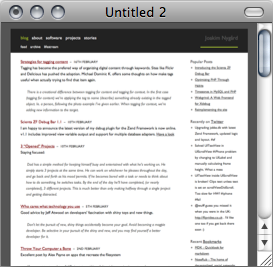
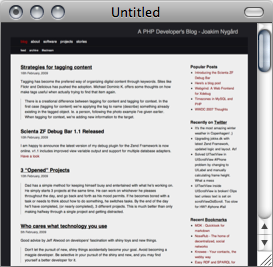
I think the comparative screenshots above illustrates the point exactly. There is a much better separation of content in the new on the right and I am frankly appalled at how it looked before with text all over the place. I belive this is a step in the right direction :)
17 Feb 2009 - permalink
Tagging has become the preferred way of organizing digital content through keywords. Sites like Flickr and Delicious have pushed the adoption. Michael Dominic K. offers some thoughts on how make tags useful when actually trying to find that item again.
There is a creational difference between tagging for content and tagging for context. In the first case (tagging for content) we’re applying the tag to name (describe) something already existing in the tagged object. Ie. a person, following the photo example I’ve given earlier. When tagging for context, we’re adding new information to the target.
10 Feb 2009 - permalink
Staying focused:
Dad has a simple method for keeping himself busy and entertained with what he’s working on. He simply starts 3 projects at the same time. He can work on whichever he pleases throughout the day, and go back and forth as his mood permits. If he becomes bored with a task or needs to think about how to do something, he switches tasks. By the end of the day he’ll have completed, (or nearly completed), 3 different projects. This is much better than only making halfway through a single project and getting distracted.
Scienta ZF Debug Bar 1.1
10 Feb 2009 - permalink
I am happy to announce the latest version of my debug plugin for the Zend Framework is now online. v1.1 includes improved view variable output and support for multiple database adapters. Have a look
6 Feb 2009 - permalink
Good advice by Jeff Atwood on developers’ fascination with shiny toys and new things.
Don’t let the pursuit of new, shiny things accidentally become your goal. Avoid becoming a magpie developer. Be selective in your pursuit of the shiny and new, and you may find yourself a better developer for it.
3 Feb 2009 - permalink
Excellent post by Alex Payne on apps that recreate the filesystem
If you want to store data of differing types within a lightweight organization system, I encourage you to check out the filesystem.
And a suggestion I’ve been living by with great success:
If you don’t want to be forever accumulating applications, store stuff as plain text on the filesystem. It’s dead reliable, you can shuffle it about however you want, and you’ll be able to search through it quickly, even without an index.